How it works
The picture is never handled as an image. Each frame, the RGB source is turned into a real NTSC composite waveform — a 1D voltage signal sampled at four times the colour subcarrier, about 478,000 samples a frame (910 per line, 525 lines). Every "glitch" is what happens when you rough that signal up and decode it with an imperfect receiver.
In JavaScript terms#
The waveform is one big Float32Array in GPU memory that never comes back to
the CPU. One stage of damage would be
for (let i = 0; i < signal.length; i++) out[i] = mangle(signal, i) — 478k
iterations, a dozen stages, 60 times a second, which is hopeless on one thread.
WebGPU runs the body of that loop for every i at once. Each stage is one pass:
a .wgsl shader that reads the buffer and writes it back, with the GPU
supplying the i.
The CPU does almost no signal math. Once a frame it uploads the source texture,
writes the slider values into a uniforms buffer, records the passes and submits
them. Nothing is read back except the final image the present pass draws.
Kicking a pass off is dispatchWorkgroups(x, y), which is the bounds of that
parallel loop in 2D: y counts the 525 lines and x counts samples across a
line, in groups of 64. A bind group is the list of buffers the pass is wired to,
so it's the argument list.
Passes hand data to each other through shared buffers. Most read compA and
overwrite it in place; compB exists only because channel can't read and
write one buffer at once. Alongside those runs a handful of small state buffers
— the per-line timing the sync separator recovers, the servo state for the beam
limiter and the auto-iris, the audio at line rate — and one big one, the tape
loop's two-second ring of composite frames, which is a medium rather than a
frame store: the same stretch of tape carries the same grain and the same worn
patches round after round.
Why it can be played rather than rendered#
Because the passes stay resident on the GPU, moving a slider is a write into a uniform buffer. Nothing recompiles and nothing re-renders from scratch — the next frame simply reads different numbers. That's the whole reason there can be this many controls, all live at once, and it's what separates this from a file-based tool.
Two places don't parallelise, and they shape what can be added:
sync.wgslruns on a single thread, because a PLL is a flywheel: each line's phase depends on the line before it. It's latency on one core rather than GPU throughput, and it's the one pass that can't scale.decodestages a shared tile per row, so horizontal offsets have to be uniform across a line. Per-pixel horizontal scaling — H size, linearity, pincushion — would read outside that tile and needs the staging rebuilt first.
The pipeline itself is an ordered array of passes in src/gpu/pipeline.ts, each
one a shader in src/gpu/shaders/, with the FIR filters designed from real MHz
specs in src/signal/filters.ts. For the full pass graph, the buffer layouts
and what it takes to add a control end to end, see
ARCHITECTURE.md.
The chain#
Five blocks — Source, Encoder, Channel, Receiver, Display — with feedback folding back in every frame.

The same thing pass by pass, in the order they run. Every arrow is labelled with the buffer it carries:
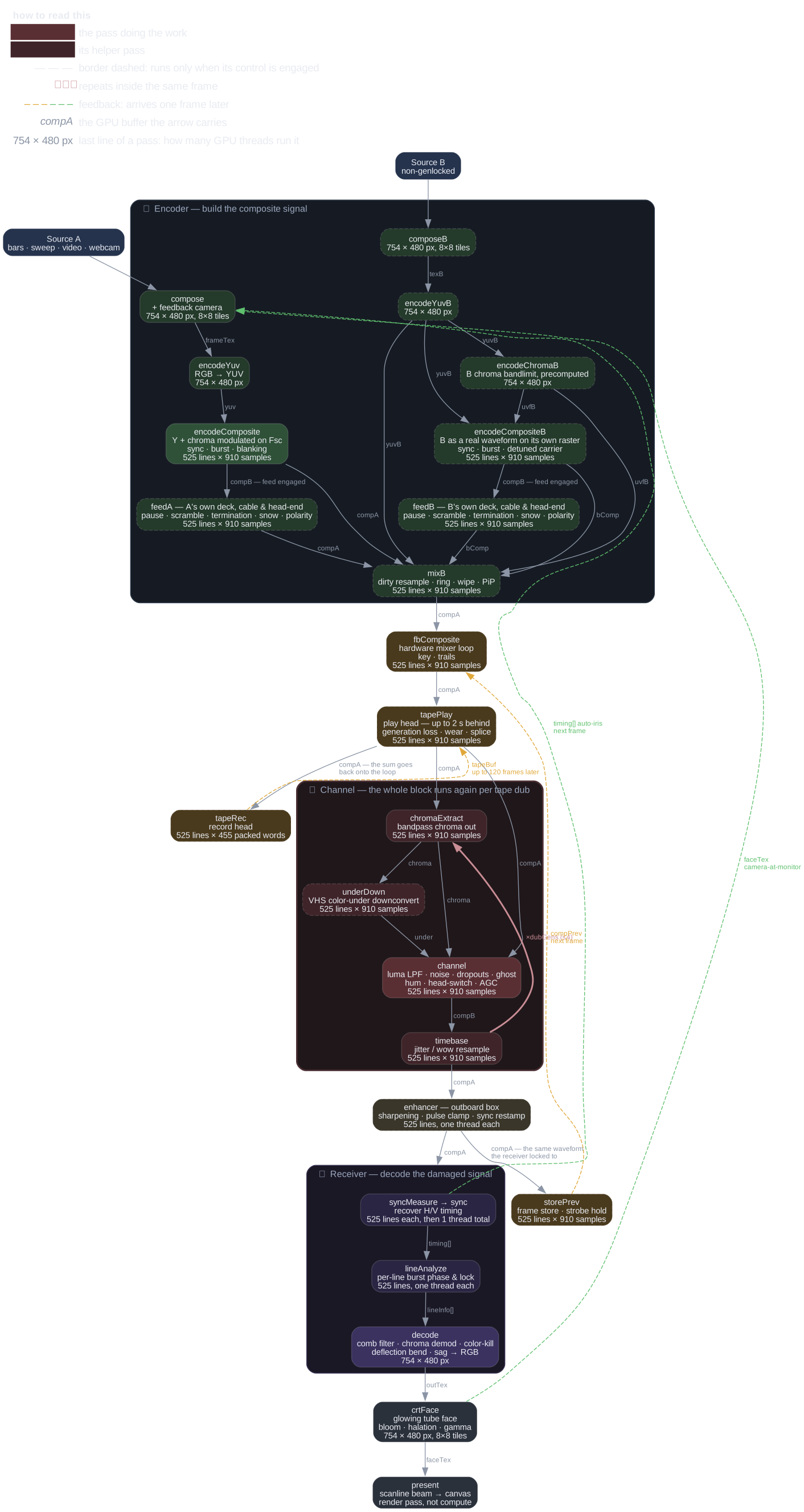
The diagram carries its own key, and a unit test asserts it draws exactly
the passes the engine builds. Sources are Graphviz —
pipeline-simple.dot,
pipeline.dot, domains.dot,
controls.dot; pnpm run docs regenerates every
diagram in light and dark (needs dot on PATH).
| Stage | Pass(es) | What it models |
|---|---|---|
| Encoder | compose, encodeYuv, encodeComposite |
RGB → YUV → composite: luma plus chroma quadrature-modulated onto the subcarrier, with sync, burst and blanking |
| Dirty mix | composeB, encodeYuvB, mixB |
a second, non-genlocked source mixed or wiped into the finished composite, with its own hue, ring mod and detune |
| Loops | fbComposite, tapePlay, tapeRec |
the mixer loop blending back the waveform the decoder saw a frame ago, and the tape loop's play and record heads across the bus |
| Channel | chromaExtract, underDown, channel, timebase |
the tape/RF path: colour-under, band-limiting, noise, dropouts, ghosting, hum, head switch, timebase jitter. Loops once per dub generation |
| Enhancer | enhancer |
an outboard box between deck and set: sharpening, clamping, sync restamping. Runs before anything measures sync |
| Receiver | syncMeasure, sync, lineAnalyze, decode |
an imperfect TV: sync recovery, per-line burst lock, comb filtering, chroma demod, colour kill, deflection bend |
| Display | crtFace, present |
the lit tube face — bloom, halation, gamma — then the scanline beam profile to the canvas |
The three feedback loops#
- Camera at monitor (image domain) — before re-encoding,
composereads back the previous frame's lit tube face and zooms, rotates, shifts and dims it. It photographs an emissive screen, not the raw decoder output. - Hardware mixer (signal domain) —
storePrevstashes the damaged composite the decoder saw, andfbCompositeblends it into the next frame with keying and trails. Feeding back at signal level means it dot-crawls and smears like a real vision mixer. - Tape loop (signal domain, but through a medium) —
tapeRecwrites the bus onto a ring of composite frames andtapePlayreads it back through up to four heads at their own distances behind. The return is recorded again, so a repeat is a real generation older rather than a fader's worth quieter.
Three ways to move the picture sideways#
A horizontal displacement can come from three different places, and they aren't interchangeable. What tells them apart is what happens to the colour.
![The picture moved sideways — which of the three domains is it? Signal domain (timebase, channel) resamples the waveform, so hue wobbles with it; cause is tape time-base error. Sync domain (sync to timing[]) mis-locates the line start, so hue follows and a large enough error throws colour; cause is hold/flagging. Deflection domain (bendAt, HV sag, audio bend inside decode) bends the tube's own scan after decoding, so hue must not move; cause is tube geometry, sag, speaker bend.](img/domains-dark.svg)
- Signal — the waveform itself is resampled, so the burst moves with the picture and hue wobbles too. This is tape time-base error.
- Sync — the receiver mis-locates the line start. The burst gate follows it, and a large enough error mistimes that gate and throws the colour off. This is hold and flagging.
- Deflection — the tube's own scan is bent, after decoding, so hue must not move at all. These are indexed by raster line rather than source row, which is why a rolling picture slides through a bend that stays put on the glass.
It's the distinction most worth having before you touch anything here: route a geometry fault through the sync path and it will spin hue that should have stayed still.
EFFECTS.md goes the other way from here, down to each control
and the fault behind it. ARCHITECTURE.md goes further in,
to the pass graph, the buffer layouts and the invariants worth knowing before
changing any of it.