People who create complex applications may, over time, take custom screenshots for bespoke doc pages/tutorials or make power point slides or send emails to their boss to say “Look at this cool feature we have!”
This is nice, but it doesn’t really scale. These screenshots don’t tell the user the exact steps you took to achieve this with your app, and making complex, multi-step tutorials is hard to maintain over time as the app changes. Oftentimes, a tutorial isn’t even written, leaving the knowledge bank of how to do things in your brain..
To externalize this brain-only content, you should make your documentation system more automated. Specifically: you should aim to make the screenshots in your documentation 100% automatically generated
How
I recommend making puppeteer scripts for this. You can make AI agents write puppeteer scripts pretty effectively
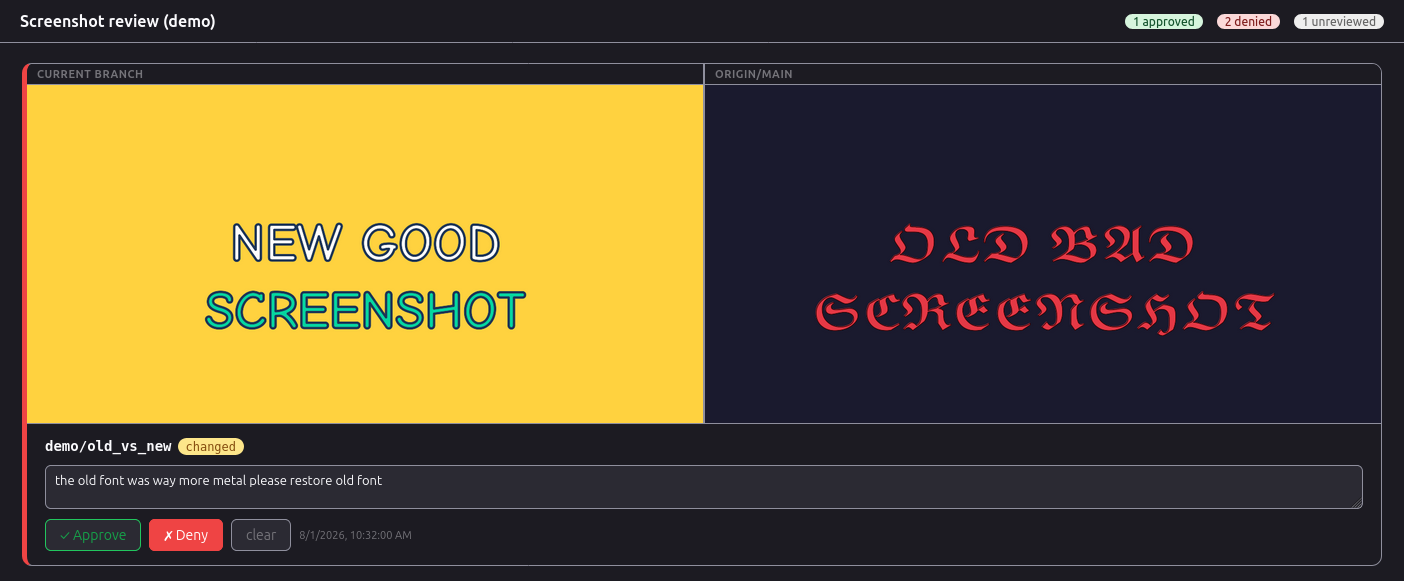
Make a small ‘review’ webapp to help review screenshots
To help visually inspect the large set of screenshots, I made a simple review app that puts all the screenshots on a webpage with a couple filters, and then I can press “APPROVE” or “DENY” and add a deny reason. This uses a local dev-only express.js server, with a textfield for the deny reason, which it writes to a file named reviews.json.
Then, I just periodically ask Claude ‘please read bad items in reviews.json and continue making fixes’.
Nitty-gritty considerations
You can also add things like a pixel tolerance threshold (e.g., flag only if >1% of pixels changed) if you encounter minor test flakiness. I don’t necessarily regenerate all figures on every CI run, but periodic runs should be fully automated.
Automate the annotations on top of the tutorial images too
To truly improve the screenshots it is often necessary to add an extra layer of ‘markup’ to them. Before, you might have manually gone into powerpoint or mspaint to do this…that is a huge deterrent to continuously updating your docs. Make the annotations on your images automated too! Making accessible selectors on your webpages helps to locate elements on the page.
There are many benefits to this type of workflow
- It forces you to exercise real high-value end-to-end user workflows that you want people to use. Similar to the Beyoncé rule from Google…if you like a cool workflow in your app make a 100% automated tutorial about it
- It forces you to work on accessibility, because you should make your puppeteer scripts use simple selectors, not complicated ones
- It forces you to think about navigating complex states in the app or even, supplying complex state tree snapshots (e.g. mobx-state-tree/zustand) as json or just more simple and bespoke url state (e.g. nuqs)
- It enables agentic improvement of your docs. I can now just say “write a tutorial for topic X” and get 100% reproducible script and screenshots for it. After starting this, we quickly expanded a new ‘tutorials’ section in our docs in a way that I really think is going to help users.
Conclusion
There is no real excuse not to do this now! Now go out there and automate those screenshots
Similar notion
- Reproducible research https://hbiostat.org/rr/
- Literate programming https://en.wikipedia.org/wiki/Literate_programming
Footnote
This is written from the perspective of someone who works on a small open-source product team consisting of basically, well, just me. Different types of teams may have different considerations, though I think any team should consider this
Also, some people might say, they have demo links, or storybooks, isn’t that enough? Particularly if you have a complex web app, my claim is, no. You should make screenshots. I can review screenshots very quickly by scrolling them and adding the textbox reviews in the aforementioned screenshot review app. With storybooks and live demos, there is a friction that causes trouble, I don’t believe you could review things nearly as fast.